
Close Menu
    Categories
    • Home
    • News
    • Grand Theft Auto
      • GTA Online
      • Guides
      • Roleplay
      • GTA Trilogy
      • Screenshots
    • GTA 6
    • Event Week
    • GTA+
    • FiveM
    • Red Dead
    • Rockstar Games
      • Community
      • Logos
      • CircoLoco
      • Bully
      • Max Payne
      • L.A. Noire
      • Midnight Club
      • Take-Two
    • Team
    Facebook X (Twitter) Instagram
    X (Twitter) Facebook Instagram Threads RSS Bluesky
    RockstarINTELRockstarINTEL
    NEWSLETTER
    • Home
    • News
    • Grand Theft Auto
      • GTA Online
      • Guides
      • Roleplay
      • GTA Trilogy
      • Screenshots
    • GTA 6
    • Event Week
    • GTA+
    • FiveM
    • Red Dead
    • Rockstar Games
      • Community
      • Logos
      • CircoLoco
      • Bully
      • Max Payne
      • L.A. Noire
      • Midnight Club
      • Take-Two
    • Team
    RockstarINTELRockstarINTEL
    Home»News»Rockstar Games Just Let Players Pick Which Launcher To Use For Their Games
    News

    Rockstar Games Just Let Players Pick Which Launcher To Use For Their Games

    Aaron TruemanBy Aaron TruemanSeptember 17, 2025
    The Rockstar Games logo—a black 'R' with a white star on a yellow square with rounded corners—is centered against a colorful, tropical sunset background. Silhouettes of purple and magenta palm trees frame the logo on both sides. The sky features pink, orange, and purple hues, suggesting a Vice City setting. Two tiny birds are visible in the lower right background, next to the registered trademark symbol.
    Share
    Facebook Twitter LinkedIn Pinterest Email

    Rockstar Games have published a new update to their launcher which gives players more freedom. The Rockstar Games Launcher lets players purchase games directly from Rockstar but some people prefer to get their games from alternative launchers such as Steam or the Epic Games Store. We’ve known for some time just how popular games such as Red Dead Redemption 2 are on Steam.

    With the latest addition to the RGL, fans can now easily boot from their launcher of choice. This was spotted by community member PLTytus.

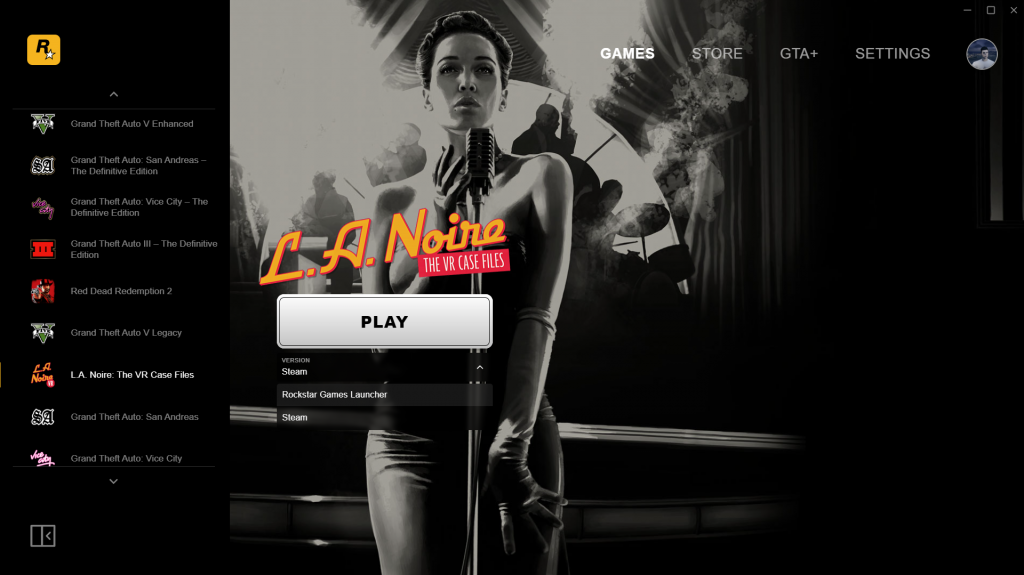
    Whenever you visit a game on the Rockstar Games Launcher, you can now access a submenu to choose which launcher if you have it purchased across the different launchers. It will have Rockstar Games Launcher followed by Steam and ends with the Epic Games Launcher.

    For example, if you have GTA V on an Epic Games account and on Steam, you can now override which version boots from within the launcher. Below is a screenshot of the dropdown menu when clicked. It will only appear if you have games on different launchers connected to your Rockstar Games account.
    Secondary Addition

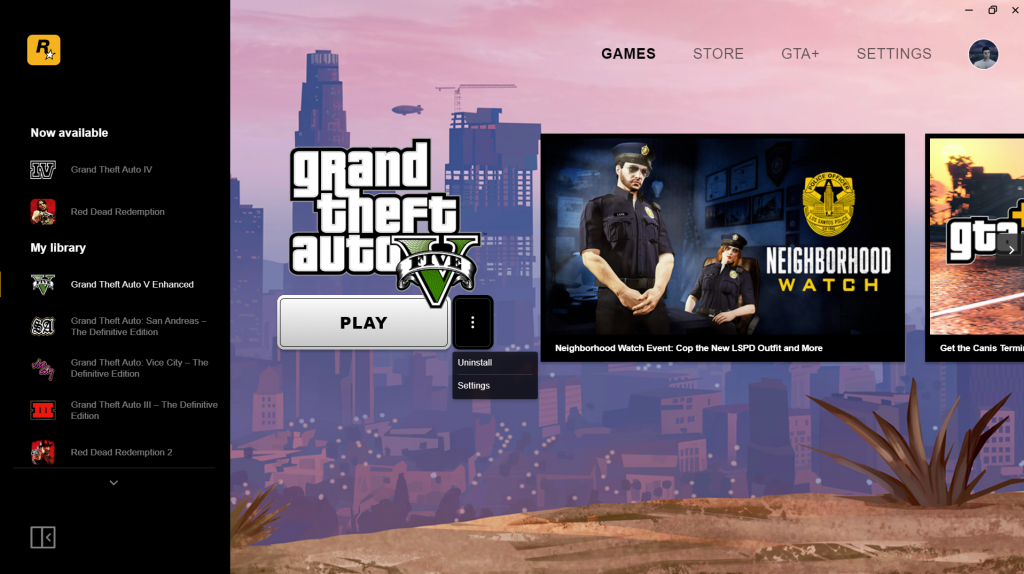
    There is also a three dots aka the kebab menu that appears next to the “play” button on installed games. Clicking the three dots will open up a drop down. From here, two options will be present: Uninstall and Settings. This lets players have quicker access to these options. You can see a screenshot of it below.
    These new Rockstar Games Launcher additions came as part of an update that contains a long awaited feature: Discord Rich Presence. It had been in development for some time but now it is fully functional across several of Rockstar’s titles. Learn more here.

    Let us know down in the comments. For more GTA 6 news updates or anything else relating to Rockstar Games, stay tuned to RockstarINTEL.

    • RockstarINTEL Bluesky
    • Grand Theft Auto News X
    • Red Dead News X
    • RockstarINTEL X
    • RockstarINTEL Instagram
    • RockstarINTEL Threads
    • RockstarINTEL Facebook
    • RockstarINTEL RSS Feed
    • RockstarINTEL TIKTOK
    • RockstarINTEL LinkedIn

    Subscribe to our newsletter!

    Share. Facebook Twitter Pinterest LinkedIn Tumblr WhatsApp Email
    Previous ArticleRockstar Games Launch Discord Integration For Their Titles Ahead Of GTA 6
    Next Article Rockstar Games End Support For Social Club Messaging
    Aaron Trueman

    As a fan of Rockstar Games and part of the GTA community, Aaron used his passion to co-found and run GTA Online News / RockstarINTEL.

    Related Posts

    New GTA Online Event Week: Lunar New Year (Feb 12th-18th)

    February 12, 2026

    New GTA Online Update Fixes Glitches And Prevents App Usage

    February 11, 2026

    GTA Online Mod alt:V Multiplayer Shut Down By Take-Two

    February 10, 2026

    Lack Of Max Payne Remake Updates Due To Rockstar Games

    February 10, 2026

    Comments are closed.

    Latest
    Event Week

    New GTA Online Event Week: Lunar New Year (Feb 12th-18th)

    By Aaron TruemanFebruary 12, 2026

    It’s another GTA Online Weekly Update and it’s the Lunar New Year and Valentine’s event!…

    New GTA Online Update Fixes Glitches And Prevents App Usage

    February 11, 2026

    GTA Online Mod alt:V Multiplayer Shut Down By Take-Two

    February 10, 2026

    Lack Of Max Payne Remake Updates Due To Rockstar Games

    February 10, 2026
    Community
    Event Week

    New GTA Online Event Week: Lunar New Year (Feb 12th-18th)

    By Aaron TruemanFebruary 12, 2026

    It’s another GTA Online Weekly Update and it’s the Lunar New Year and Valentine’s event!…

    New GTA Online Update Fixes Glitches And Prevents App Usage

    February 11, 2026

    GTA Online Mod alt:V Multiplayer Shut Down By Take-Two

    February 10, 2026

    Lack Of Max Payne Remake Updates Due To Rockstar Games

    February 10, 2026
    X (Twitter) Instagram Facebook RSS Threads Bluesky
    • Home
    • Twitter
    • Team
    • Contact Us
    • Privacy Policy

    © 2026 RockstarINTEL.
    Manage Cookie Settings
    RockstarINTEL uses the IP2Location LITE database for IP geolocation.

    Type above and press Enter to search. Press Esc to cancel.