
Close Menu
  • Charts
  • Community
  • GTA 6
  • GTA Online
    • A Safehouse in the Hills
    • Agents of Sabotage
    • Bottom Dollar Bounties
    • Casino
    • Cayo Perico
    • Event Week
    • GTA+
    • Los Santos Drug Wars
    • Money Fronts
    • Roleplay
    • San Andreas Mercenaries
    • The Cluckin’ Bell Farm Raid
    • The Contract
    • The Criminal Enterprises
    • The Kortz Center Heist
  • FiveM
  • GTA Trilogy
  • Guides
  • Max Payne
  • News
  • Red Dead
    • Red Dead Online
  • Reviews
  • Rockstar Games
    • Agent
    • Bully
    • CircoLoco
    • L.A. Noire
    • Midnight Club
    • Music
    • Red Hook Crit
    • Take-Two
  • Screenshots
X (Twitter) Bluesky Facebook Instagram Threads RSS
RockstarINTELRockstarINTEL
NEWSLETTER
  • Home
  • News
  • GTA 6
  • GTA Online
  • Event Week
  • GTA+
  • Guides
  • FiveM
  • Red Dead
  • Rockstar Games
    • Screenshots
    • Community
    • Logos
    • CircoLoco
    • Max Payne
    • Bully
    • L.A. Noire
    • Midnight Club
    • Take-Two
RockstarINTELRockstarINTEL
Home » How To Fix The GTA VI Weather Bug And Make It Rain

How To Fix The GTA VI Weather Bug And Make It Rain

November 26, 2026 GTA 6
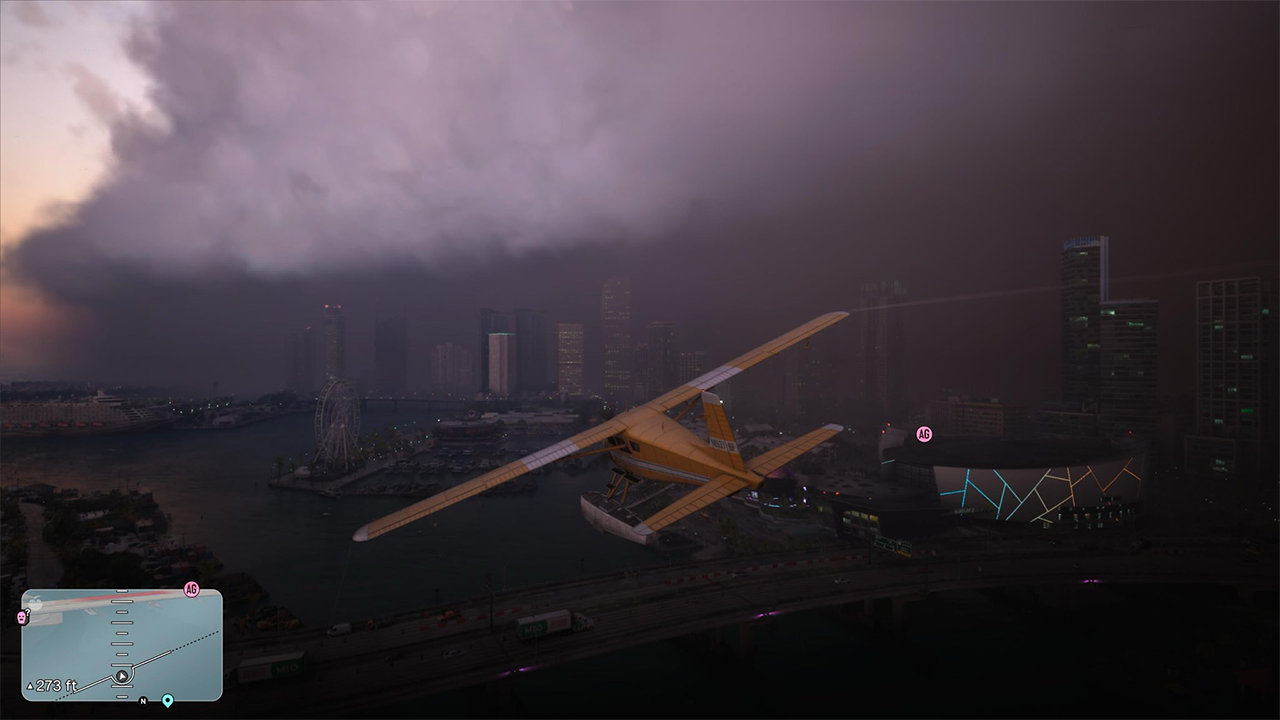
A yellow seaplane flies over a city skyline and waterfront beneath a massive dark storm cloud in GTA VI. A highway bridge and lit buildings stretch below as heavy clouds roll over the area.
Credit: https://x.com/LFCForever98/status/2125900138845819025
Share
Twitter Facebook Bluesky Pinterest Reddit WhatsApp Threads Email Copy Link

The lack of changing weather allowing for rain and hurricanes has been a big criticism of GTA VI. However, it is bugged and there is a way to fix it and we’ll be showing you how to do it if you play on PS5.

Whilst Rockstar Games released a patch earlier this week to fix weather not changing for extended periods, people are still not seeing much of a difference. However, there is a fix you can do yourself to make sure the weather works as Rockstar intended. Follow the steps in order below and you’ll see a noticeable difference! This only works for PS5. If an XBOX Series X|S fix appears we’ll be sure to cover it too.

  1. Fully turn off your PS5/PS5 Pro console
  2. Press and hold the console’s power button until it beeps twice
  3. This will enter safe mode and you’ll see it appear on screen
  4. Plug your PS5 DualSense controller into the console
  5. Within the safe mode screen, scroll down and select option 6: Clear Cache and Rebuild Database
  6. Within this submenu, choose option 1: Clear System Software Cache
  7. When you see “The system software cache will be cleared”, select OK
  8. Wait for your PS5 to clear its cache, it will take a few minutes.
Credit: @LFCForever98

This was first spotted by a Twitter user named @Fallneck_Talnek. Many, many people are reporting this did work very well for them. Did you find this guide useful and are you seeing more rain in Leonida? Let us know down in the comment section below.

In other Grand Theft Auto VI news, we compared the game’s full console graphics settings seeing what is different from console to console. Plus, we covered the top 10 most requested GTA VI mods.

You can order your PS5 or XBOX copy of Grand Theft Auto VI with this link. Using the link to order the game will help support this website as we’ll earn a small commission. Thank you!

For more news on GTA VI, stay tuned to RockstarINTEL and sign up to our newsletter for a weekly round-up of all things Rockstar Games delivered straight to your inbox.

Aaron Trueman

As a fan of Rockstar Games and part of the GTA community, Aaron used his passion to co-found and run GTA Online News / RockstarINTEL.

Related Posts

GTA VI x GTA+ Screenshots Gallery

November 27, 2026

Working GTA VI Online Multiplayer Mod Even Includes Proximity Chat

November 27, 2026

GTA VI Features a Hidden Memorial for Rockstar Developers’ Late Family Members

November 26, 2026
Leave A Reply Cancel Reply

Latest News

GTA VI x GTA+ Screenshots Gallery

November 27, 2026

Working GTA VI Online Multiplayer Mod Even Includes Proximity Chat

November 27, 2026

GTA VI Features a Hidden Memorial for Rockstar Developers’ Late Family Members

November 26, 2026

GTA VI Features a Previously Unreleased Song From D’Angelo

November 26, 2026

Rockstar Developer Explains How Players Should Experience GTA VI

November 26, 2026

GTA Online Event Week: GTA VI Hype Continues (Nov 26th-Dec 2nd)

November 26, 2026

Guides

How To Fix The GTA VI Weather Bug And Make It Rain

November 26, 2026

GTA VI 60FPS Glitch Discovered And Here’s How To Do It

November 22, 2026

30+ Hidden GTA VI Controls and Secret Mechanics You Probably Missed

November 21, 2026

How To Unlock The Venturas Blvd Elegy In GTA VI

November 20, 2026

Best GTA VI Settings You Need To Change

November 20, 2026

Why XBOX Has a Secret GTA VI Performance Advantage Over PS5

November 19, 2026
X (Twitter) Bluesky Facebook Instagram Threads RSS

© 2026 RockstarINTEL
RockstarINTEL Team
Privacy Policy
Manage Consent RockstarINTEL uses the IP2Location LITE database for IP geolocation.

Type above and press Enter to search. Press Esc to cancel.